
Access The Barracuda Control Center
To access the Barracuda Control Center, you will need to download the “Firewall Admin” client. You can find this piece of software on the Barracuda Download Portal.
When you open the software, start a new session. Click on the radio button with “Control Center”, fill in “cc.ccflex.eu” as IP Address/Name, your username and password. These are your Onelogin credentials. After this, press the “Sign in” button
Kappa Data has 2 different control centers, CC1 and CC2. Please check on which control center you manage your firewalls. If you used the control center in the past (ccHOSTED or fcHOSTED) mind this.
- bngf1.kappadata.be is now cc1.ccclassic.eu
- bngf2.kappadata.be is now cc2.ccclassic.eu
In the screenshot below you have to change cc.ccflex.eu to cc1.ccclassic.eu or cc2.ccclassic.eu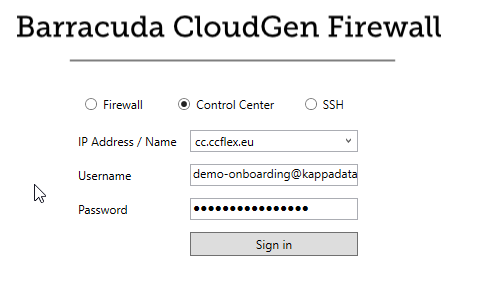
Now you have access to the Control Center!